Top 10 Cool Boy's AI Image Prompts for Stylish Cinematic Portrait Photography
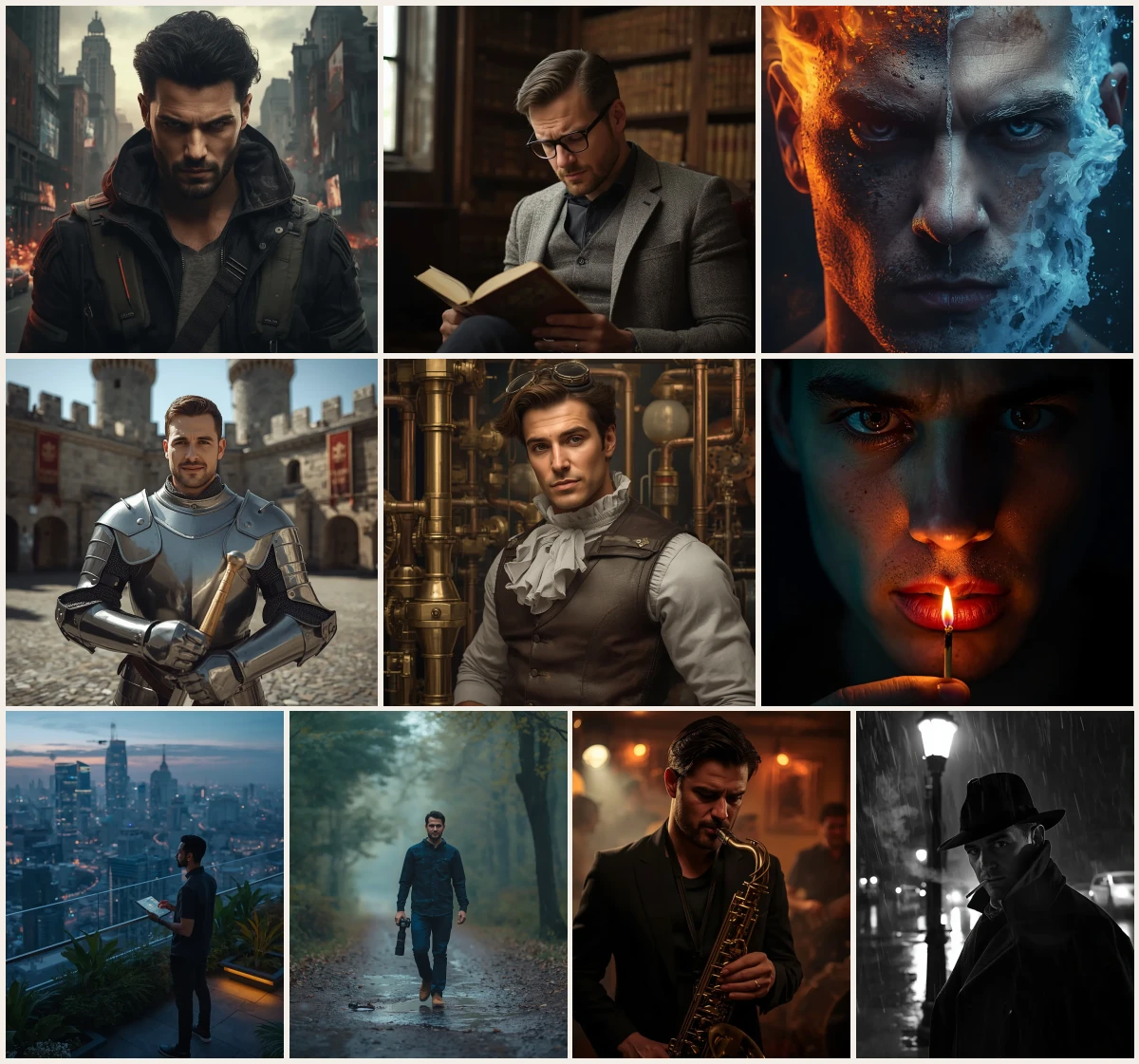
These cool boy's ai prompts are a shortcut to stylish cinematic portraits that look like film stills. The collection suits anyone who wants a strong male character image without learning complicated lighting diagrams: beginners picking their first prompt, hobbyists building a portfolio, and writers who need a face for a story. Each idea gives you a subject, a place, and a mood, so you always have somewhere to start.
Across all ten, the same habits repeat. You describe an outfit, a location, a prop, and a light source, then let the model handle the rest. A rebel leader in a dystopian future, a knight in gleaming plate armor, a detective under a flickering streetlamp: each one is a small scene, not just a face. That is what makes a cinematic portrait feel real.
The example images you see with these prompts are AI-generated, so the same words can look different in another tool. One model may push contrast, another may soften skin, and a third may change the background. Treat the prompt as a recipe, not a photocopy. Below is a beginner-friendly walkthrough of why the wording works, how to pick a base photo, and how to adjust each idea for your own style.
Table of contents
- A quick comparison of the ten cinematic portrait prompts in this collection.
- 10 Cool Boy's Image Stylish Cinematic Portrait Photography Prompts
- Handsome Man as a Rebel Leader in a Dystopian Future
- Handsome Man in a Historic Library with Leather-Bound Books
- Hyperrealistic Close-Up Portrait of a Man Split Between Fire and Ice
- Handsome Man as a Medieval Knight in Shining Armor
- Handsome Man in a Steampunk Inventor's Workshop
- Ultra-Close Cinematic Portrait of a Man with a Lit Match
- A Man Contemplating the Future in a Futuristic City Rooftop Garden
- Double Exposure of a Man Walking in a Woodland with Camera
- Handsome Man as a Gritty Musician in a Dark Jazz Club
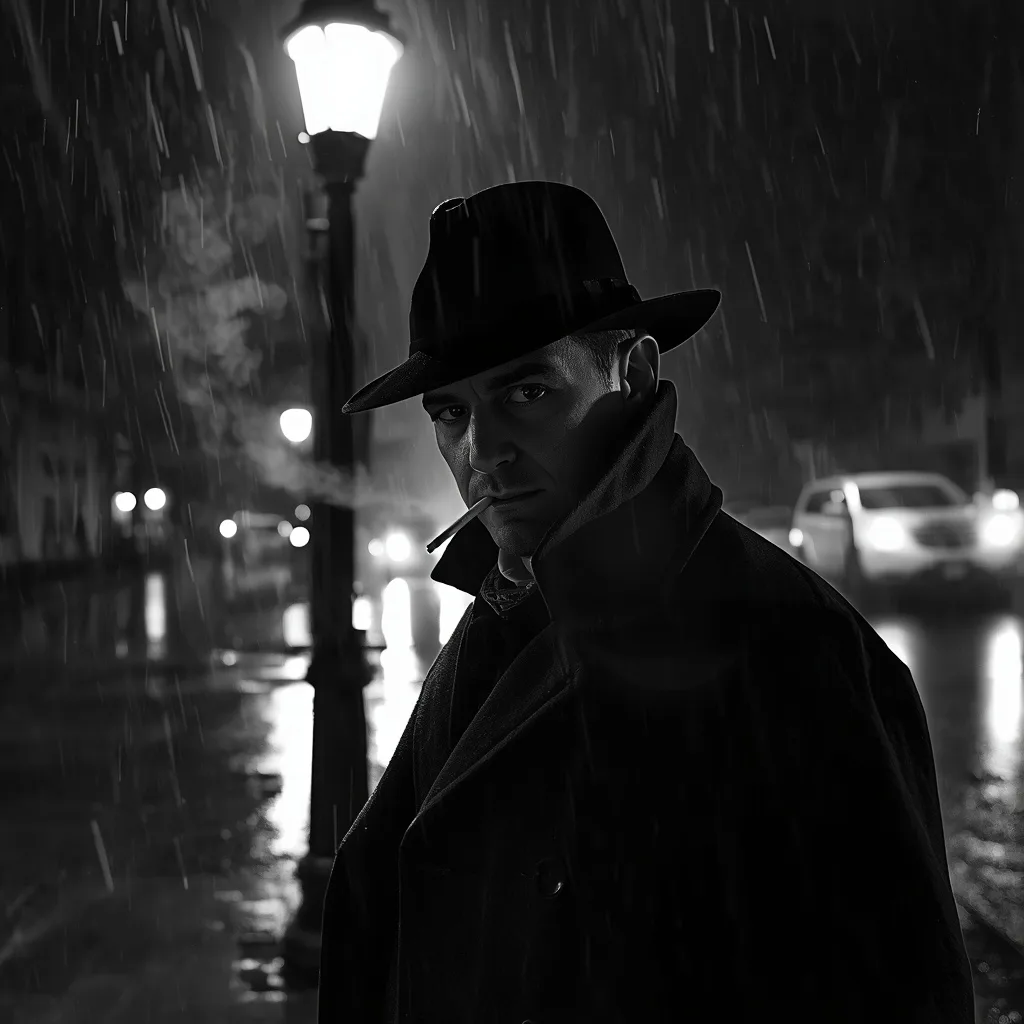
- Man as a Detective in a Rain-Soaked Film Noir Street
- Why these cool boy's ai prompts work
- Choosing the right base photo for a cinematic portrait
- Lighting, colour and camera words that matter
- Step-by-step workflow from photo to final image
- Customising the cool boy's ai prompts for your own style
- How to use these prompts
- Pro tips for better results
- Common mistakes to avoid
- Frequently asked questions
- Final thoughts
| Prompt | Look | Best for | Tool |
|---|---|---|---|
| Rebel Leader in Dystopian Future | Defiant face, crumbling skyline | Story cover | Midjourney |
| Historic Library with Leather Books | Warm, scholarly, opulent interior | Profile photo | ChatGPT |
| Close-Up Split Between Fire and Ice | Half flame, half frost, dramatic | Album art | Leonardo AI |
| Medieval Knight in Shining Armor | Gleaming plate armor, castle courtyard | Fantasy poster | Flux |
| Steampunk Inventor's Workshop | Brass gears, amber workshop light | Character sheet | Gemini |
| Ultra-Close Portrait with Lit Match | Intense gaze, match glow, vertical | Profile photo | Midjourney |
| Futuristic City Rooftop Garden | Lush garden, neon dusk skyline | Story scene | ChatGPT |
| Double Exposure Woodland Camera | Man blended with rainy forest | Blog header | Leonardo AI |
| Gritty Musician in Dark Jazz Club | Smoky low light, saxophone focus | Event invite | Flux |
| Detective in Rain-Soaked Noir Street | Fedora, trench coat, wet pavement | Book cover | Gemini |
Example images on this page are AI-generated. The same prompt can look different in another tool or model version.
10 Cool Boy's Image Stylish Cinematic Portrait Photography Prompts
 #1
#1Prompt 1 of 10
Handsome Man as a Rebel Leader in a Dystopian Future
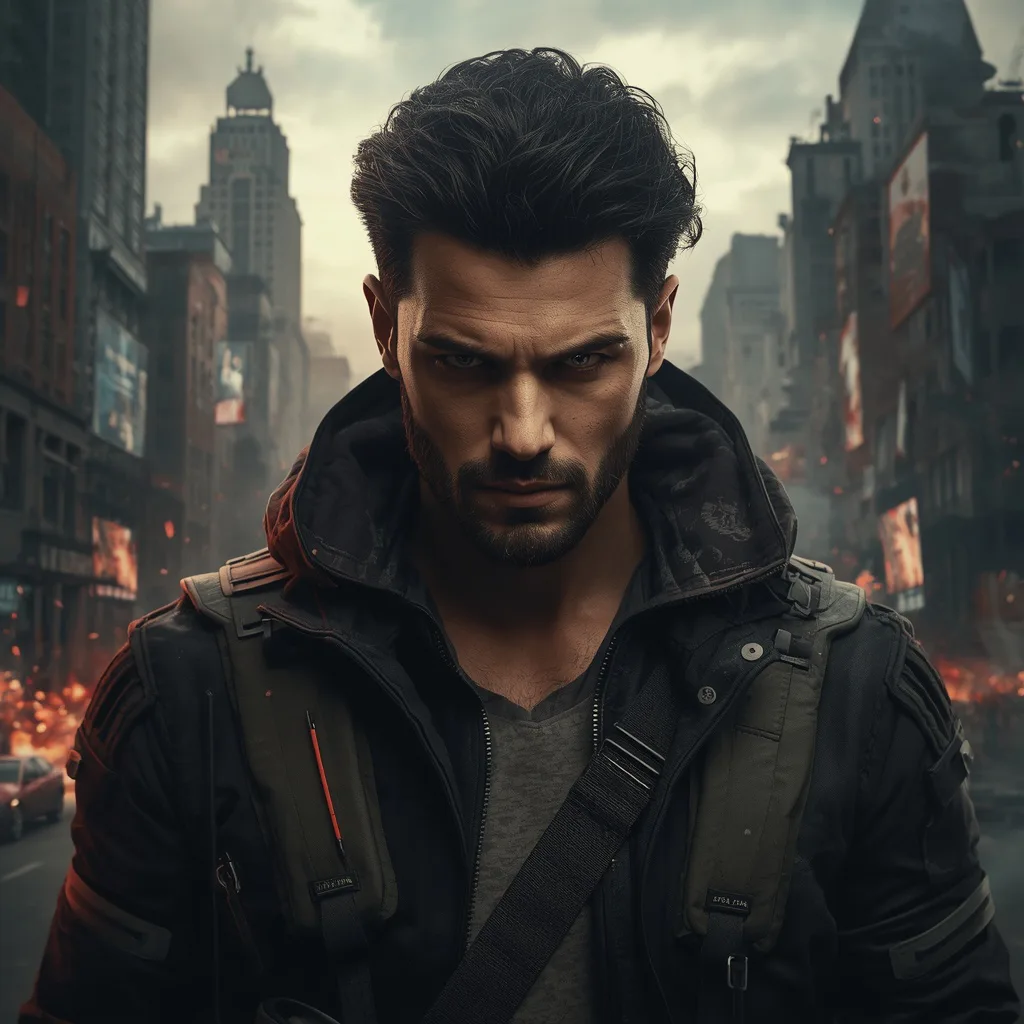
This prompt builds a gritty rebel leader portrait against a crumbling dystopian city, with ruined skyscrapers, flickering holographic ads and distant explosions. The style is cinematic and chaotic, lit for dramatic contrast so his determined gaze reads as the focal point. Saying 'subtle glowing cybernetic implants' keeps the sci-fi tech restrained, whereas 'heavy glowing implants' would push the image toward full cyberpunk and change the tone.
A powerful portrait of a handsome man, portrayed as a rebel leader, his face marked with determination and defiance, standing against a backdrop of a crumbling dystopian city. His gaze is intense and unwavering, inspiring hope. He wears rugged, utilitarian gear with subtle glowing cybernetic implants. The background features ruined skyscrapers, flickering holographic ads, and distant explosions, creating a gritty, chaotic atmosphere. Dramatic, high-contrast lighting, with hints of red and orange from fires. High detail, 8k resolution, capturing the wear on his gear and the desolation of the city, with a dark, muted, and fiery color palette. Ratio 3:4.
 #2
#2Prompt 2 of 10
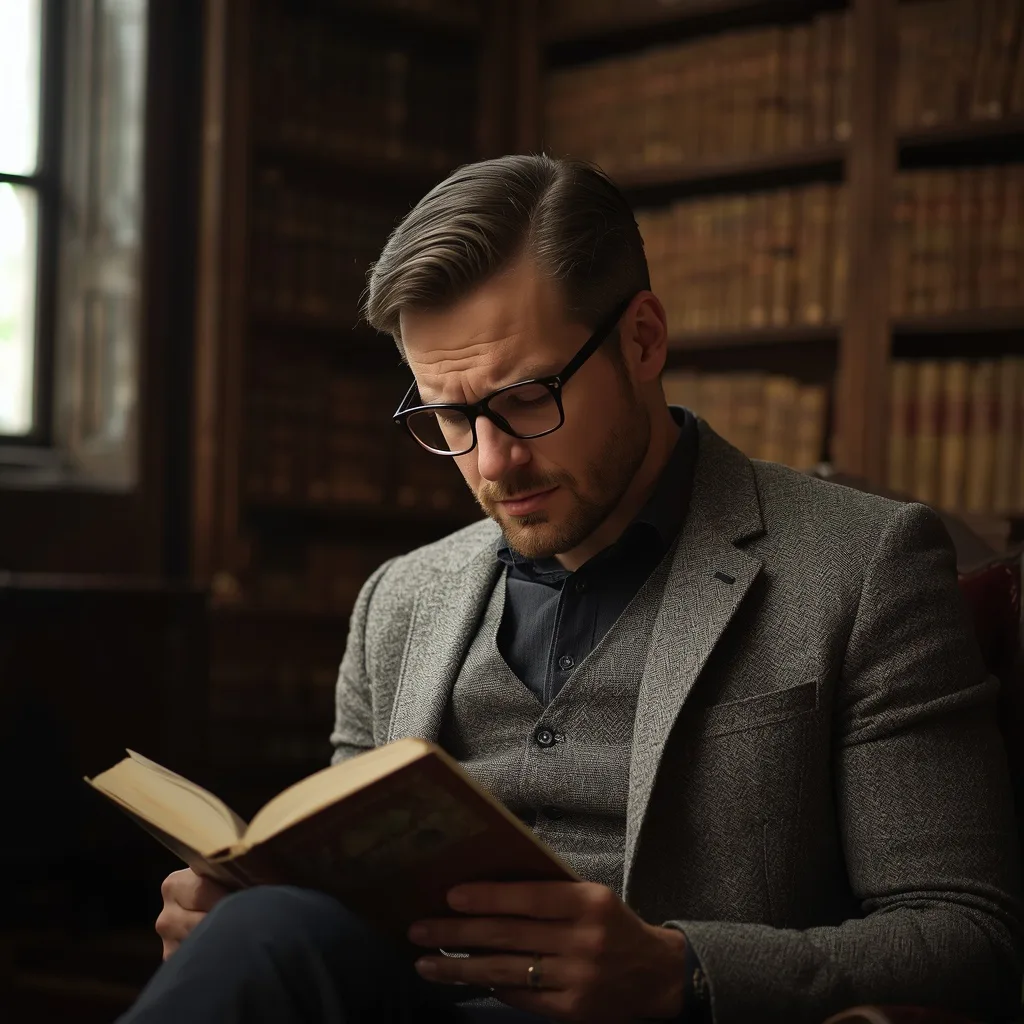
Handsome Man in a Historic Library with Leather-Bound Books
Here a distinguished man reads in an opulent historic library, wearing a tweed blazer and spectacles against floor-to-ceiling shelves of antique, leather-bound books. The style is soft and academic, with diffused window light creating a rich, scholarly atmosphere. The phrase 'deeply engrossed in reading' directs his downward gaze and furrowed brow; writing 'looking up from his book' instead would change the portrait from private study to direct engagement.
A distinguished portrait of a handsome man, deeply engrossed in reading, seated in an opulent, historic library. His brow is slightly furrowed in concentration, conveying intellect and gravitas. He wears a classic tweed blazer and spectacles. The background is a wall of floor-to-ceiling bookshelves, laden with antique, leather-bound books, creating a rich, academic atmosphere. Soft, diffused light from a tall window illuminates the scene, creating gentle shadows. High detail, 8k resolution, capturing the texture of the book spines and his contemplative expression, with a warm, earthy color palette. Ratio 4:3.
 #3
#3Prompt 3 of 10
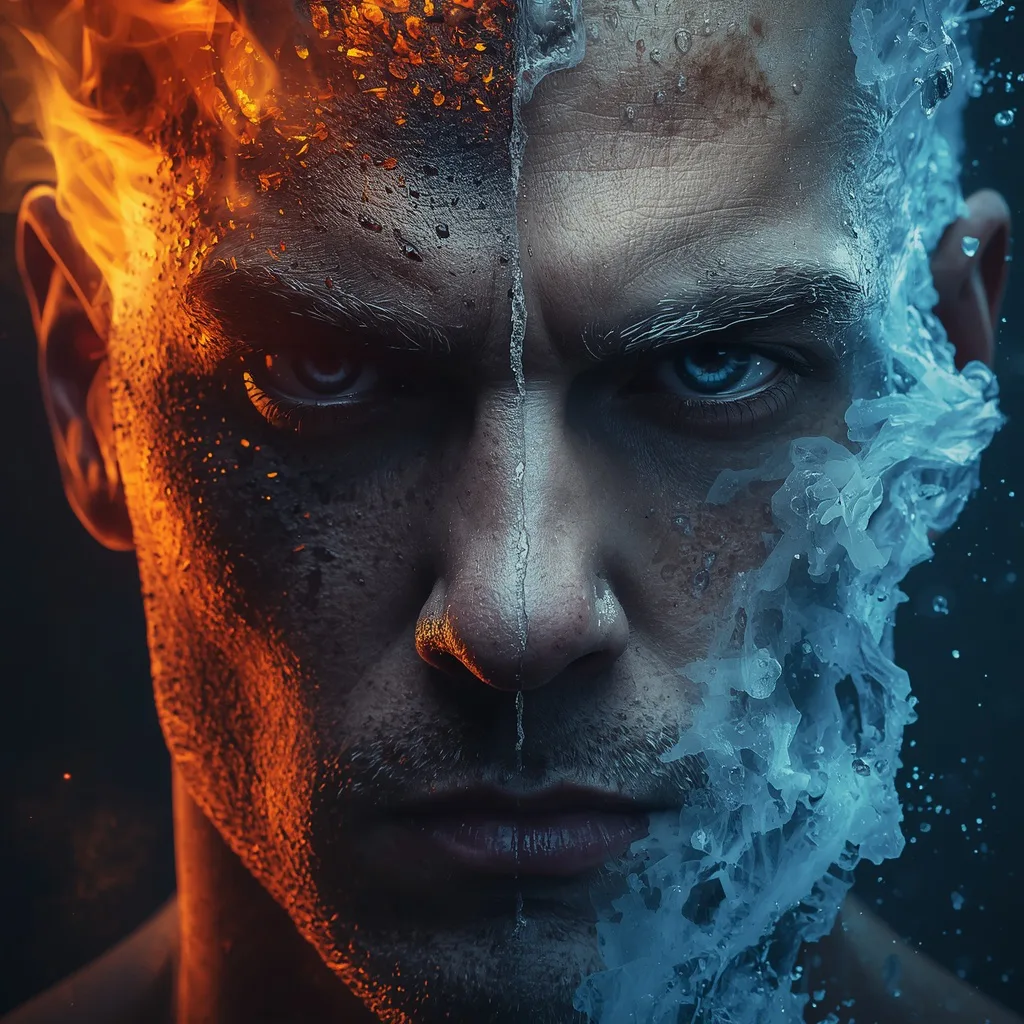
Hyperrealistic Close-Up Portrait of a Man Split Between Fire and Ice
This prompt creates a hyperrealistic close-up of a face split between burning orange flames, embers and scorched skin on one side, and water, icy droplets and steam on the other. The style is moody and high-contrast, using elemental lighting to emphasize the divide. Specifying 'intense eye contact' keeps both halves unified; removing it would let the model treat the face as two separate fragments instead of one person.
Hyperrealistic close-up portrait of a man's face, dramatically split between elemental fire and ice. The left half of his face glows with burning orange flames, glowing embers, and scorched skin textures, creating a sense of intense heat. The right half is submerged in water, adorned with icy droplets and ethereal steam, conveying extreme cold. The moody lighting and strong contrast accentuate the elemental divide. His intense eye contact with the viewer draws them into this powerful, cinematic scene, rendered in breathtaking 8K resolution with intricate detail, making it powerfully hyper-realistic.
 #4
#4Prompt 4 of 10
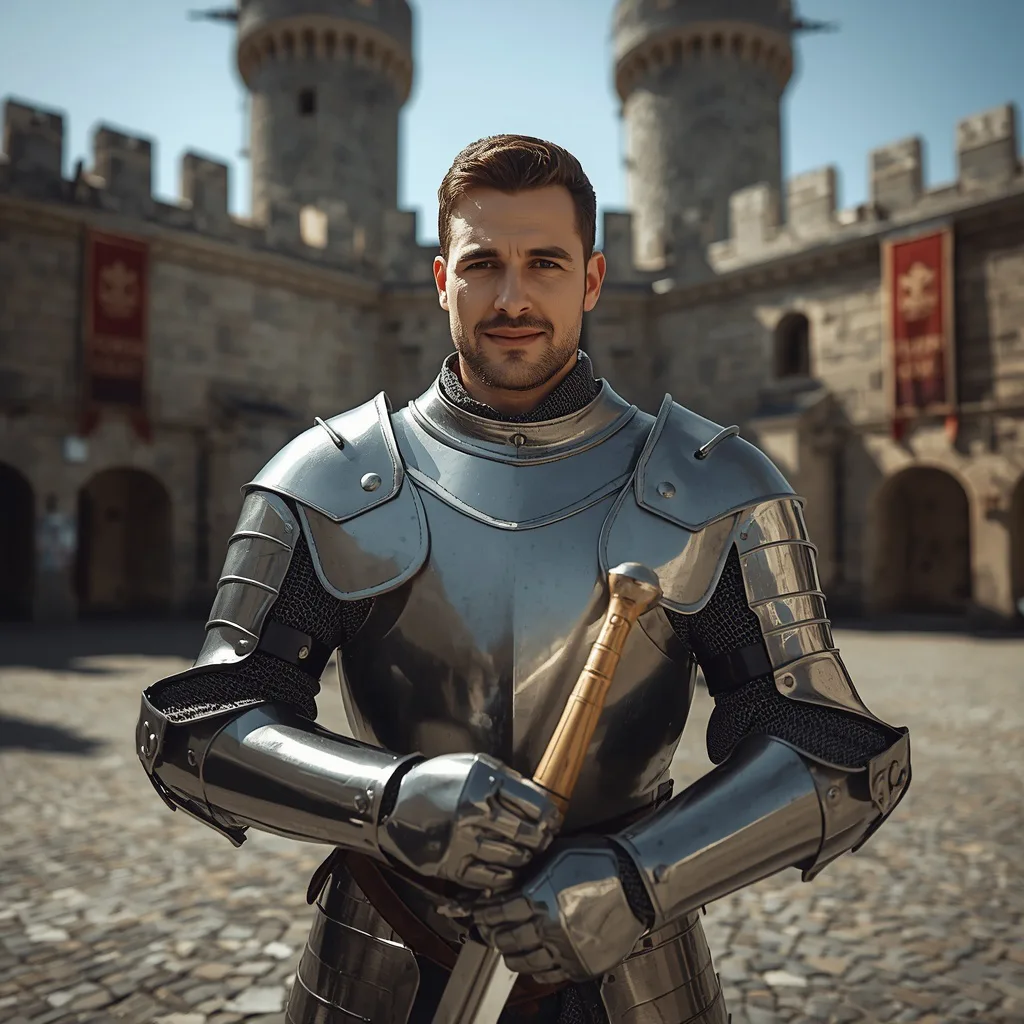
Handsome Man as a Medieval Knight in Shining Armor
This prompt places a handsome man in full gleaming plate armor inside an ancient castle courtyard, holding a polished sword that reflects the sunlight. The style is heroic and historical, with bright natural light highlighting the metal and stone walls, banners and archways. Saying 'a slight hint of a smile' softens the knight into approachable heroism; 'stoic and unreadable' would make the same armor feel colder and more severe.
A heroic portrait of a handsome man, portrayed as a valiant medieval knight, standing in full, gleaming plate armor within the courtyard of an ancient castle. His expression is stoic and honorable, a slight hint of a smile on his lips. He holds a polished sword, its blade reflecting the sunlight. The background features towering stone walls, banners, and archways, creating a powerful, historical atmosphere. Bright, natural sunlight highlights the metallic sheen of his armor. High detail, 8k resolution, capturing the intricate details of the armor and the castle's architecture, with a silver, gray, and deep blue color palette. Ratio 3:4.
 #5
#5Prompt 5 of 10
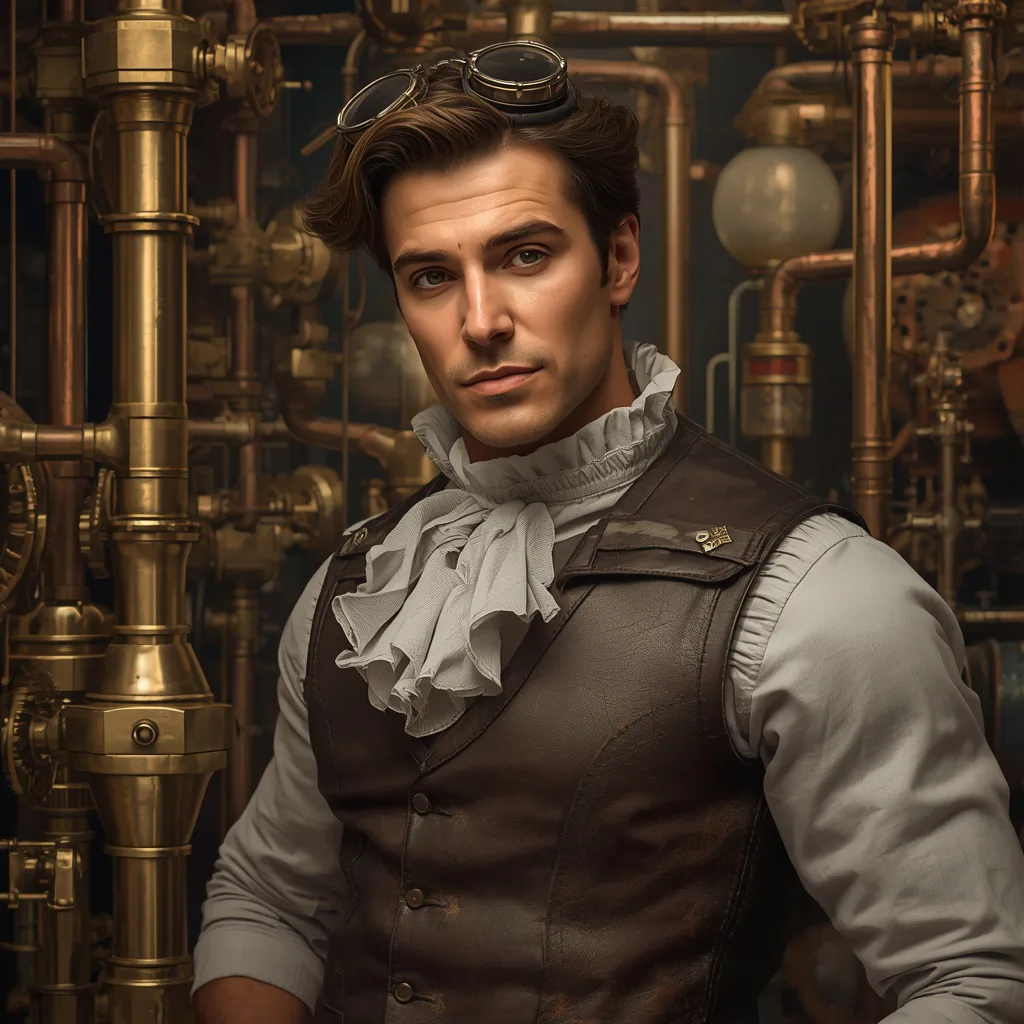
Handsome Man in a Steampunk Inventor's Workshop
This prompt frames a curious, intelligent man in a steampunk workshop full of intricate gears, brass, polished copper pipes, spinning cogs and bubbling beakers. He wears a leather and brass vest over a ruffled shirt with goggles pushed up on his forehead, lit softly by gas lamps at high detail and 8k resolution. Calling the vest 'meticulously crafted' pushes fine material detail, while 'worn leather vest' would shift the character from master inventor to scrappy tinkerer.
A detailed portrait of a handsome man, with a curious and intelligent expression, amidst the intricate gears and brass of a steampunk inventor's workshop. He wears a meticulously crafted leather and brass vest over a ruffled shirt, with goggles pushed up onto his forehead. The workshop is filled with an array of complex contraptions, polished copper pipes, spinning cogs, and bubbling beakers, all softly lit by gas lamps. High detail, 8k resolution, capturing the metallic sheen and the elaborate craftsmanship of the steampunk elements, with a rich, antique gold and brown color palette. Ratio 4:3.
 #6
#6Prompt 6 of 10
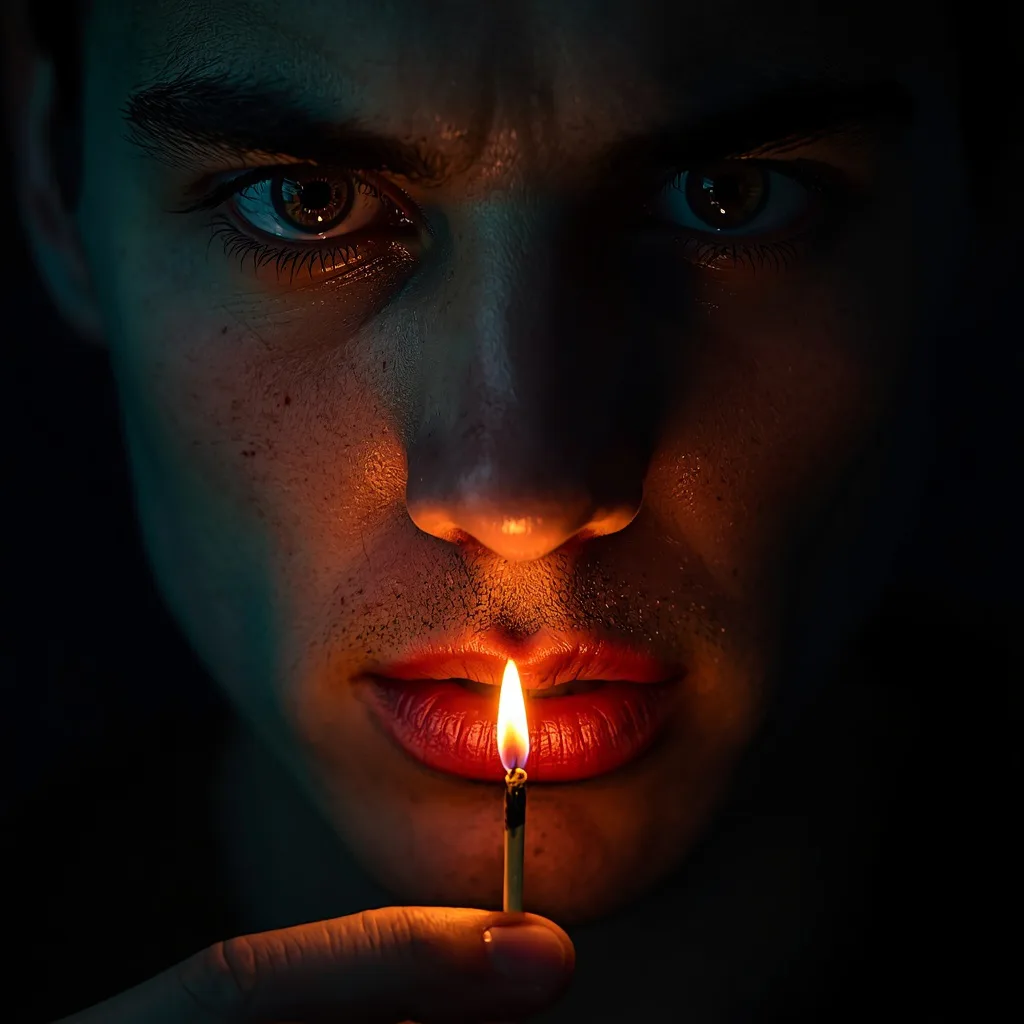
Ultra-Close Cinematic Portrait of a Man with a Lit Match
This prompt asks for a vertical 3:4 ultra-close cinematic portrait of a man holding a lit match below his mouth so the flame becomes the warm key light from underneath. Slightly damp skin catches specular highlights, revealing freckles and texture, while a cool edge fill from above and behind creates teal-orange contrast. Writing 'flame just below his mouth' is the crucial wording choice, because moving the match to the side would turn this into ordinary candlelight rather than dramatic underlighting.
Create a vertical 3:4 ultra-close cinematic portrait of a man, face centered with a direct, intense gaze and slightly parted lips. He holds a lit match just below his mouth, positioning the flame to become the warm key light from underneath, casting dramatic upward shadows. His skin is slightly damp to catch specular highlights, revealing subtle freckles and texture. A subtle cool edge fill from above and behind creates a teal-orange contrast. The background is pure dark/black. Shot on a full-frame camera with a 100mm macro (or 85mm) lens at f/2.8, 1/200s, ISO ~400, focusing on the eye nearest the camera for shallow depth of field and creamy falloff. In post-production, boost micro-contrast and clarity in the eyes/skin, add a gentle glow around the flame, and keep colors rich with warm highlights and cool shadows to preserve the dramatic, hyperreal mood.
 #7
#7Prompt 7 of 10
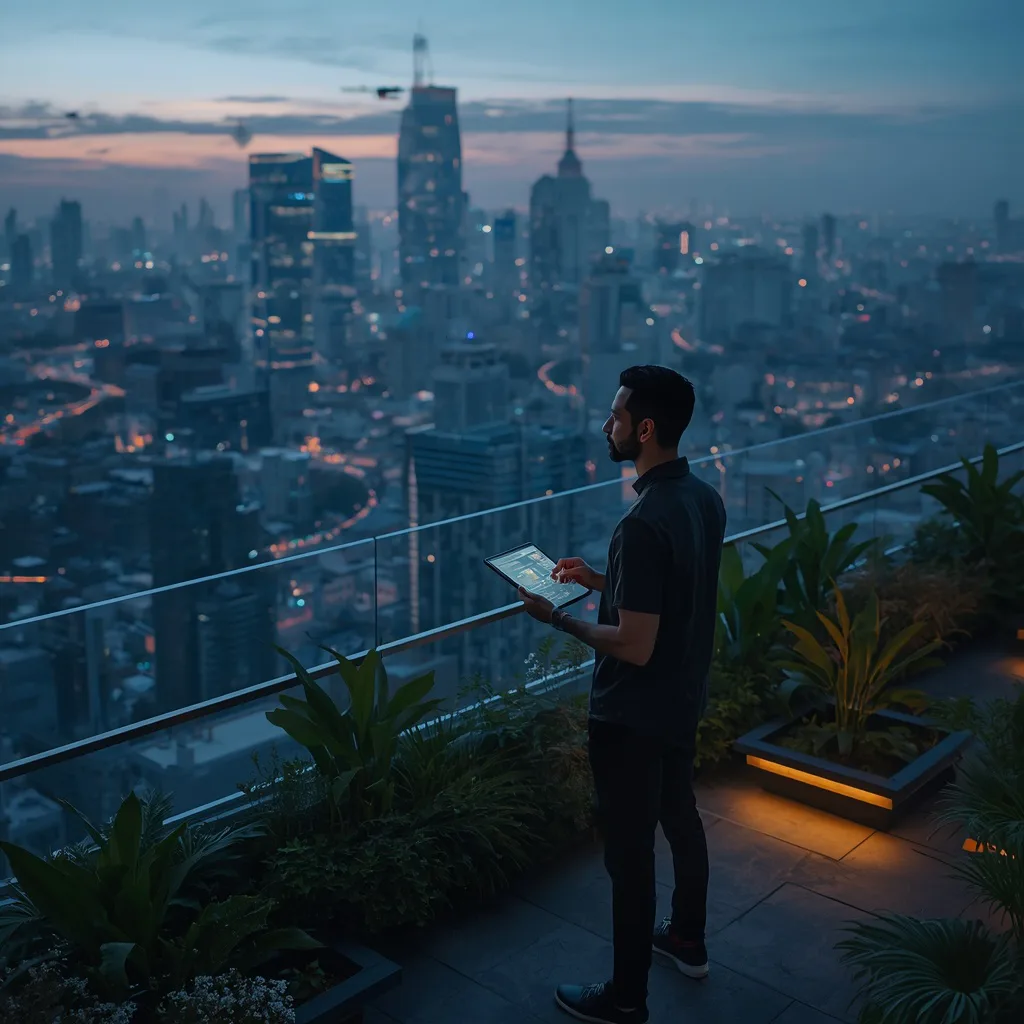
A Man Contemplating the Future in a Futuristic City Rooftop Garden
This prompt shows a man on a lush futuristic rooftop garden overlooking a neon metropolis at dusk, holding a glowing data tablet with a thoughtful, contemplative gaze. He wears sleek minimalist clothing with subtle tech accents, surrounded by glowing flora and integrated seating. The word 'contemplative' sets a quiet, introspective mood; 'determined' would make the same scene feel like a mission briefing rather than a moment of reflection.
A man stands on a lush, futuristic rooftop garden overlooking a sprawling metropolis at dusk. Neon lights from flying vehicles and towering skyscrapers illuminate the city below. He holds a glowing data tablet, his gaze thoughtful and contemplative, looking out at the vast urban landscape. He wears sleek, minimalist clothing with subtle tech accents. The garden features glowing flora and integrated seating. The mood is futuristic, introspective, and slightly melancholic, contemplating humanity's technological advancements. Cinematic lighting, 8K resolution, 16:9 aspect ratio, capturing modern solitude.
 #8
#8Prompt 8 of 10
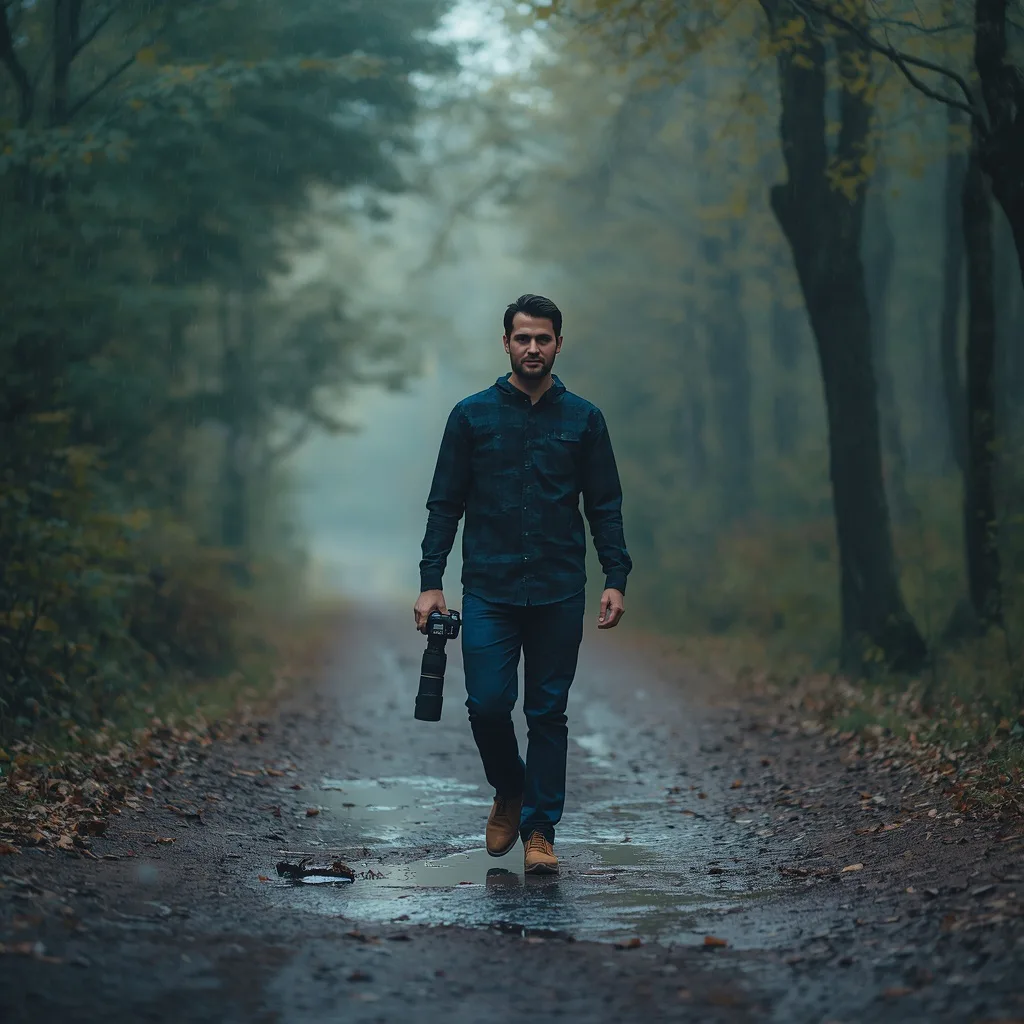
Double Exposure of a Man Walking in a Woodland with Camera
This prompt blends a man walking a tranquil woodland with a Sony camera and long lens, light rain falling and puddles reflecting along the dirt path. The double exposure merges his silhouette with the textures and light of the surrounding trees, all rendered in cool tones for a quiet, cinematic feel. Specifying 'seamlessly blended' matters, because 'hard-edged double exposure' would create a graphic split rather than an ethereal overlay.
Create a double exposure image. The main image features a man walking through a tranquil woodland, holding a Sony camera with a long lens. Small amounts of rain fall gently, creating subtle reflections on puddles along the dirt path. The double exposure, seamlessly blended, incorporates the same man's silhouette with the textures and light of the surrounding trees, using natural light. The entire image should be rendered using cool tones, enhancing the serene and introspective mood. The blend should be organic, making the man feel integrated with the natural environment, captured with a 3:4 aspect ratio.
 #9
#9Prompt 9 of 10
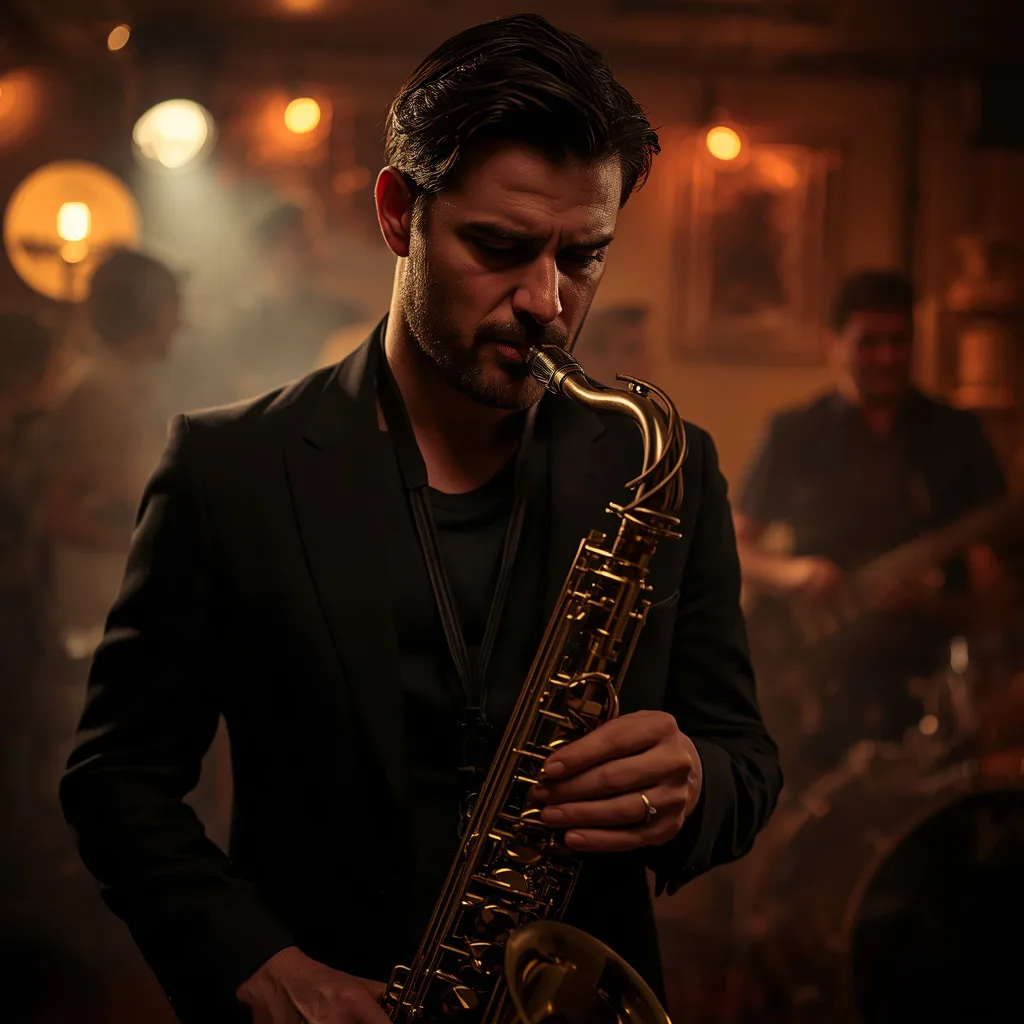
Handsome Man as a Gritty Musician in a Dark Jazz Club
This prompt captures a handsome man playing saxophone in a dim, smoky jazz club, wearing a dark fitted suit with a loosened tie and an expression of deep passion and concentration. The background holds blurred band silhouettes, a stage spotlight and the warm glow of the bar, creating a soulful atmosphere at high detail and 8k resolution. Saying 'intense gaze focused on his saxophone' keeps the image about the music; 'looking at the camera' would turn it into a posed portrait.
A compelling portrait of a handsome man, portrayed as a gritty musician, his intense gaze focused on his saxophone in a dimly lit, smoky jazz club. His expression is one of deep passion and concentration as he plays. He wears a dark, fitted suit with a loosened tie. The background features blurred silhouettes of other band members, a spotlight on the stage, and the warm glow of the bar, creating a soulful, atmospheric ambiance. High detail, 8k resolution, capturing the metallic sheen of the instrument and his passionate performance, with a dark, moody, and warm amber color palette. Ratio 3:4.
 #10
#10Prompt 10 of 10
Man as a Detective in a Rain-Soaked Film Noir Street
This prompt sets a classic film noir detective under a flickering streetlamp on a rain-soaked street at night, in a fedora and trench coat with collar turned up and a lit cigarette curling smoke into the misty air. Neon signs and car headlights shimmer on wet asphalt while his expression stays grim and world-weary. The phrase 'face partially obscured by shadow' is the key wording, because 'clearly lit face' would erase the noir mystery and flatten the mood.
A man, styled as a classic film noir detective, stands under a flickering streetlamp on a rain-soaked city street at night. He wears a fedora and a trench coat, collar turned up, his face partially obscured by shadow. A lit cigarette dangles from his lips, smoke curling into the misty air. Reflections of neon signs and car headlights shimmer on the wet asphalt. His expression is grim and world-weary. The mood is mysterious, gritty, and atmospheric. Black and white, high contrast, 35mm film look, 8K resolution, 16:9 aspect ratio, capturing the essence of classic noir.
Why these cool boy's ai prompts work
This section helps anyone who has typed a short prompt and gotten a flat, generic face. The problem is usually missing context. These prompts work because they name a role, a place, and a feeling at the same time, so the model has enough to build a scene instead of a headshot.
Take the medieval knight prompt. The phrase "full, gleaming plate armor within the courtyard of an ancient castle" does three jobs: it sets the outfit, the material, and the location. The word "gleaming" tells the model to add specular highlights on metal, which instantly reads as cinematic. Swap it for "rusty" and the same knight becomes a weary veteran. That is the level of control a good phrase gives you.
As a practical choice, keep the character description short and let the setting do the heavy lifting. If you add too many facial details, the model may ignore the background. Pick one strong role, one clear place, and one mood word, then generate. You can always add more later once the composition feels right.
Choosing the right base photo for a cinematic portrait
Beginners often ask whether they need a photo at all. For text-to-image tools, no. For image-to-image or face-reference workflows, yes, and the base photo matters more than the prompt. This section is for anyone who wants a recognizable face inside a dramatic scene.
Use a sharp, evenly lit portrait with no harsh shadows across the eyes. If you plan to use the detective in a rain-soaked film noir street, a neutral base photo lets the model add the fedora and trench coat without fighting your original lighting. The prompt phrase "under a flickering streetlamp" then controls the new light, not your old one. That is why a plain base usually beats a moody one.
One practical choice: decide the aspect ratio before you upload. A vertical 3:4 frame suits the ultra-close portrait with a lit match, while a wide 16:9 frame suits the rebel leader against a crumbling skyline. Matching the ratio to the pose saves you from cropping a hand or a shoulder later. If you are unsure, start vertical, because most cinematic portraits are built around the face.
Lighting, colour and camera words that matter
This part is for readers who already get a decent face but want the image to feel like a movie still. The difference is usually three or four words about light, colour, and camera. These prompts use them constantly, and you can borrow the same vocabulary.
The steampunk inventor's workshop prompt leans on "intricate gears and brass" to set a warm, amber palette. The jazz club prompt uses "dimly lit, smoky" to push low-key lighting and haze. In the fire-and-ice close-up, "burning orange flames" on one side and cold blue on the other create a colour split that reads as conflict. Each phrase changes the mood, not just the brightness.
A practical choice here is to add one camera word and stop. "Close-up," "ultra-close," or "vertical 3:4" is enough to guide framing. Adding five lens terms often confuses the model and flattens the result. If the face looks too smooth, add "hyperrealistic" once. If the background is too busy, remove a colour word instead of adding a new one.
Step-by-step workflow from photo to final image
This workflow is for anyone who wants a repeatable process instead of guessing. It uses the same five steps for every prompt in this list, so you can move from idea to finished portrait in a few minutes.
Start with the role and place. For the historic library prompt, write the distinguished man, the leather-bound books, and the opulent room. Add the mood next: "deeply engrossed in reading" and "brow slightly furrowed." Then choose a tool and paste the full prompt. Generate four variations, and keep the one where the hands and eyes look natural. Finally, upscale or crop to your target ratio.
One practical choice: edit only one thing per round. If the library feels too dark, change the lighting phrase, not the outfit. If the double exposure woodland image loses the Sony camera, repeat that prop word instead of rewriting the whole prompt. Small, single changes teach you what each phrase actually does, and they keep the character consistent across a series.
Customising the cool boy's ai prompts for your own style
This final section is for readers who want the collection to feel personal rather than borrowed. Every prompt here is a template: the role, place, and mood can be swapped while the structure stays the same.
Try changing one element at a time. The dystopian rebel leader becomes a resistance medic if you change the outfit and keep the crumbling backdrop. The gritty musician in a dark jazz club becomes a poet if you swap the saxophone for a notebook but keep the smoky light. The rooftop garden scene works for a scientist, an architect, or a dreamer depending on the prop you name. The place and the light carry the cinematic feel, so you can change the person freely.
A practical choice: save two versions of each prompt, one clean and one with your edits. Keep the original for reference, because the wording that made the first image work is easy to lose after five changes. If you only adjust the aspect ratio or the colour of one garment, the scene still reads as the same idea. That balance is what makes these cool boy's ai prompts reusable across many projects.
🛠 How to use these prompts
- Start with prompt 1 or 4 and lock the character's core pose first: rebel leader standing defiant, knight holding a polished sword, so the rest of the scene builds around a clear silhouette.
- Name the light source in every prompt, as in prompt 6 where the lit match becomes the warm key light from underneath, because light direction controls the entire cinematic mood.
- Keep props specific rather than generic: a Sony camera with a long lens in prompt 8, a glowing data tablet in prompt 7, a saxophone in prompt 9.
- Describe the background as a layered environment, such as ruined skyscrapers with flickering holographic ads in prompt 1 or floor-to-ceiling bookshelves in prompt 2, so the model has depth cues.
- Use contrast pairs deliberately, like fire and ice in prompt 3 or warm flame against cool edge fill in prompt 6, to create the teal-orange cinematic look.
- Add material words that guide texture, such as gleaming plate armor in prompt 4, polished copper pipes in prompt 5, or damp skin with freckles in prompt 6.
- Generate vertical 3:4 for close-ups like prompt 6 and wider framing for environmental portraits like prompts 1, 7 and 10, then adjust from there.
💡 Pro tips for better results
- In prompt 6, the wording 'flame just below his mouth' is what creates upward shadows; if you move the match higher, the underlighting disappears and the portrait becomes flat.
- Prompt 3 relies on 'intense eye contact' to hold the split face together as one person; without it, models often render two disconnected halves.
- Prompt 10's 'face partially obscured by shadow' is the noir engine of the image, so avoid adding 'clearly lit face' or you lose the mystery.
- Prompt 8's 'seamlessly blended' double exposure reads as ethereal; changing it to 'hard-edged' gives a graphic poster look instead.
- Prompt 1's 'subtle glowing cybernetic implants' keeps the rebel grounded in realism, while 'heavy implants' pushes the result toward full cyberpunk.
- Prompt 5's 'meticulously crafted leather and brass vest' pulls fine material detail; 'worn leather vest' changes the character from master inventor to scavenger.
- Prompt 9's 'intense gaze focused on his saxophone' keeps the frame about performance; switching to eye contact with the camera turns it into a posed musician portrait.
Common mistakes to avoid
- Writing 'clearly lit face' in the film noir prompt 10, which flattens the shadows and removes the detective mystery. Keep 'face partially obscured by shadow' and let the flickering streetlamp and neon reflections on wet asphalt carry the mood.
- Treating the fire-and-ice prompt 3 as two separate portraits and losing the single face. Keep 'intense eye contact' and describe one man's face split down the middle, so the model blends flames and ice into one continuous portrait.
- Making the wardrobe generic in prompt 2 or prompt 4, so the library scholar and the knight lose their period identity. Name the exact pieces: tweed blazer and spectacles for the library, full gleaming plate armor and a polished sword for the knight.
- Forgetting the light direction in prompt 6 and letting the lit match become a side light or background glow. State that the flame sits just below his mouth as the warm key light from underneath, with a cool edge fill from above and behind.
❓ Frequently asked questions
What makes these cool boy's AI prompts feel cinematic instead of just posed?
Each prompt pairs a clear subject with a named light source and layered environment. Prompt 6 uses a lit match as underlighting, prompt 10 uses a flickering streetlamp and wet asphalt reflections, and prompt 1 uses ruined skyscrapers with distant explosions. That combination of directional light plus a lived-in background is what reads as a film still rather than a studio portrait.
Which tool should I use for the rebel leader and steampunk inventor prompts?
Midjourney handles both well because it responds strongly to environmental detail like flickering holographic ads or polished copper pipes and spinning cogs. If you want tighter control over the character's face and outfit, ChatGPT or Leonardo AI can be easier for iterative edits. Try the same prompt in two tools and compare, since each interprets cinematic wording differently.
Can I apply the fire and ice split to a different subject?
Yes. Keep the structure of prompt 3, one face split between two opposing elements, and swap the elements. Storm and desert, smoke and frost, or neon and moonlight all work. The key is preserving 'intense eye contact' so the two sides still read as a single person rather than two separate images stitched together.
How do I keep the noir detective prompt from looking too dark?
Prompt 10 already includes neon signs and car headlights shimmering on wet asphalt, so lean on those reflections as your fill light. Avoid adding 'brightly lit' or 'clear face', since those erase the shadow that makes the detective mysterious. If the result is muddy, ask for stronger specular highlights on the wet street instead of raising overall exposure.
Do results vary by tool and model version for these prompts?
Yes, results vary by tool and model version. A double exposure like prompt 8 may blend softly in one model and render more graphically in another, and the 8k detail wording in prompts 5 and 9 may be interpreted differently. Use the prompt as a starting point, then adjust wording about light, material and pose based on what your chosen tool returns.
Final thoughts
Start with the ultra-close portrait of a man holding a lit match. It is the simplest to copy, the vertical 3:4 frame suits a profile photo, and the single light source teaches you how much one prop can change a face. Once that feels easy, move to the knight or the detective, which add costume and setting. Remember that the example images are AI-generated, so the same words can look different in another tool. Keep these cool boy's ai prompts handy, change one detail at a time, and your portraits will stay stylish and consistent.
Related hashtags
Keep exploring